Showing posts with label Azure Backup. Show all posts

Sunday, September 11, 2016

SCDPM – Protecting SQL 2012 & above.

To protect SQL Server 2012 or SQL Server 2014, the following must be done.

  • Login to SQL Server Management Studio

SNAGHTML1b7de7

  • Add the system account NTAuthority\System to the Sysadmin group on SQL Server
  • DPM cannot protect databases that are stored on remote SMB stores
  • Availability group replicas are configured as read-only
  • When you perform an alternate location recovery for a partially contained database, you must ensure that the target SQL instance has the Contained Databases feature enabled

Hope the above illustration helps


Thursday, October 8, 2015

DPM Reporting – An error has occurred during report processing

I hit an issue on launching the DPM reporting.  The DPM is functioning well except the reporting.  It’s the issue of the SQL Reporting settings.

image

It stated as :

An error has occurred during report processing. (rsProcessingAborted).
Query execution failed for dataset ‘DataSet2’. (rsErrorExecutingCommand)
Invalid object name ‘vw_DPM_Replica’.

Steps taken to resolve :

  • Launch the Reporting Services Configuration Manager in the DPM
image
  • Select the Report Manager URL on the left panel
  • Click on the URL on the right panel

image

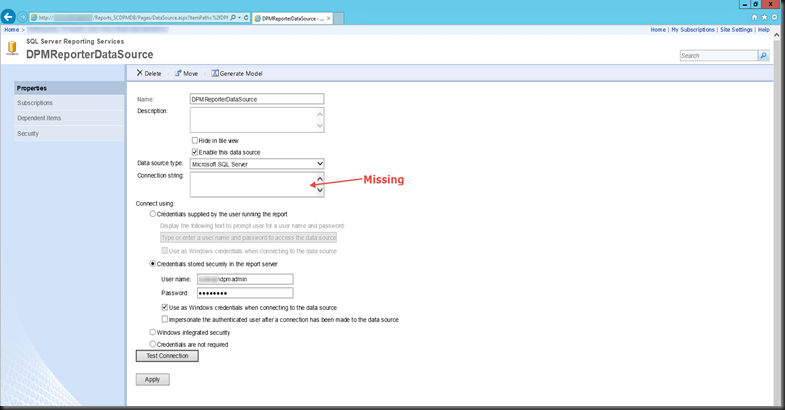
  • Double-click on the DPMReporterDataSource
image
  • The Connection string is missing.
  • Minimize this screen

image

  • Create a file call dbtest.udl on the desktop (it’s a build in Windows)
  • Double click on it.

image

  • Once the Data Link Properties launch, Select the server name (using the drop down)
  • Use the Windows NT integrated security for the credential
  • Select the database (using the drop down)
  • Click Test Connection

image

  • Click OK once it’s successful

image

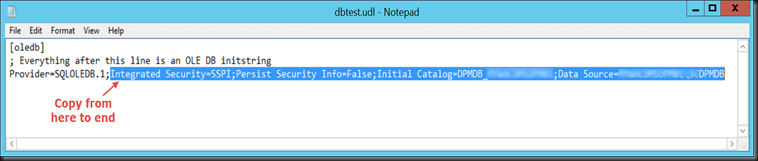
  • Right-click on the dbtest.udl and open with notepad
image

  • Copy the text from “Intergrated ….. “till the end of the line
image

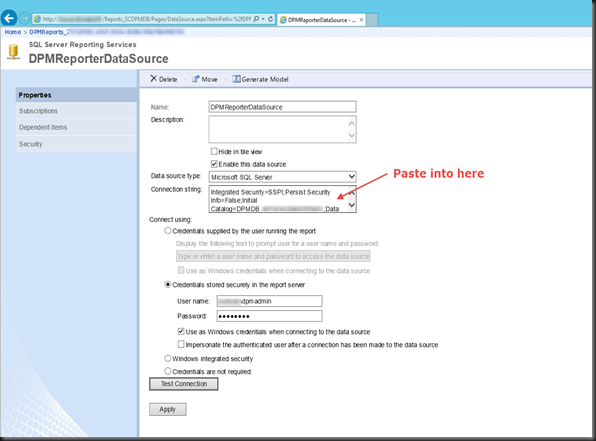
  • Maximize the DPMReporterDataSource
  • Paste the copied text into the Connection string.
  • Click on Test Connection (may request to key in password again)
  • Once successful, click Apply.

Launch the DPM reporting with no issue occurred.

keyword : DPM, SQL, SRSS, Reporting Services, rsErrorExecutingCommand, rsProcessingAborted, dataset, query execution failed, invalid object name

Thursday, August 13, 2015

Azure Recovery Services–backup increased to 54TB limit

Earlier last month I shared on how to configure the DPM 2012 R2 with Azure Recovery (Backup Vault). 

Microsoft Azure recovery Services team has officially released the backup per protection group from 1.7TB limit and now to 54TB limit on 12th Aug 2015.

You need to have the Azure Recovery Services Agent 2.0.8715.0 or higher in order for the backup to exceed the limitation of 1.7TB.

image

The news release is here.

keynote : Azure limit, ASR, Azure Recovery Services, DPM, SCDPM, storage limit.backup limit